TTM Trend
Contents
Overview
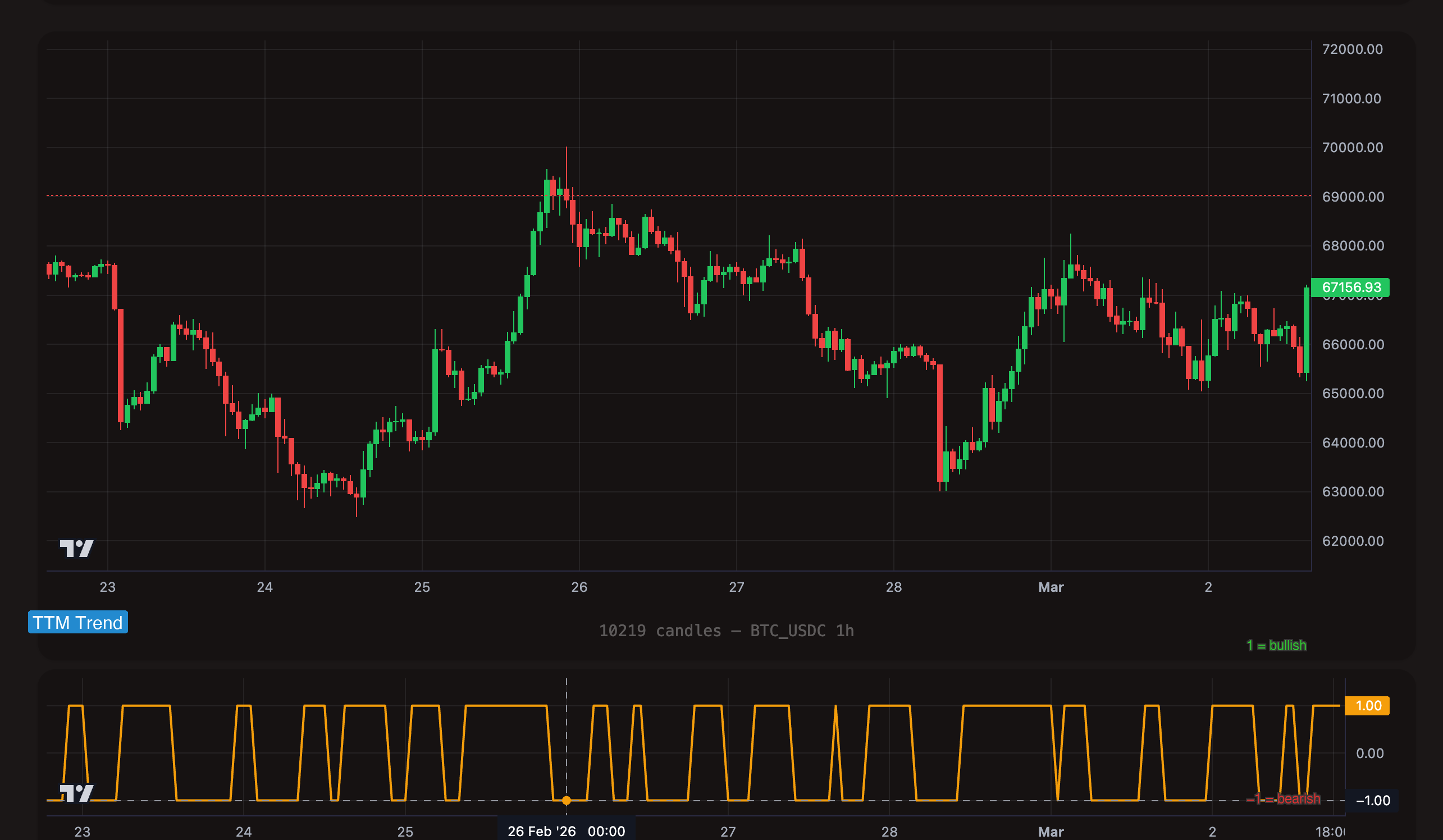
TTM Trend is a simplified trend direction indicator that distills the current market regime into one of three discrete values: bullish, neutral, or bearish. Instead of producing a continuous range of values like RSI or MACD, TTM Trend gives you a clean, unambiguous answer: what direction is the trend?
This makes TTM Trend uniquely suited for use as a trend gate -- a filter that allows or blocks trades based on the current trend direction. Rather than trying to time exact entries with TTM Trend, you use it to ensure that your other signals (RSI dips, MACD crossovers, Bollinger touches) only fire when the broader trend supports the trade.
Format
ttm_trend
TTM Trend has no period parameter. It uses a fixed internal calculation to determine trend direction. The format is always just ttm_trend.
Value range: Discrete integers only -- 1, 0, or -1.
TTM Trend Values
| Value | Meaning | Interpretation |
|---|---|---|
1 | Bullish | The market is in an uptrend. Favorable for long entries. |
0 | Neutral | No clear trend direction. The market is transitioning or consolidating. |
-1 | Bearish | The market is in a downtrend. Favorable for exits or short entries. |
TTM Trend outputs integers, not floating-point numbers. This is why the = (equals) operator works perfectly here -- there are only three possible values, and they are exact. This is the exception to the general rule that = is rarely useful for technical indicators.
Understanding Operators with TTM Trend
TTM Trend is the primary use case for the = operator. Its discrete values make equality comparisons meaningful and reliable.
= (Equals) -- The Primary Operator
What it does: True on every candle where TTM Trend equals the specified value. This is a state-based operator -- it fires as long as the condition holds.
Bullish gate (= 1):
[[actions.triggers]]
indicator = "ttm_trend"
operator = "="
target = "1"
timeframe = "1h"
This fires on every candle where the hourly trend is bullish. Use it as a filter alongside entry triggers to prevent buying in downtrends or neutral markets.
Bearish gate (= -1):
[[actions.triggers]]
indicator = "ttm_trend"
operator = "="
target = "-1"
timeframe = "1h"
This fires on every candle where the trend is bearish. Use it as an exit condition -- when the trend turns against your position, close it.
Neutral gate (= 0):
[[actions.triggers]]
indicator = "ttm_trend"
operator = "="
target = "0"
timeframe = "1h"
This fires when the market has no clear direction. Useful for avoiding trades during choppy, directionless periods.
> (Greater Than) -- Not Bearish
What it does: True when TTM Trend is greater than the target value. Since TTM Trend only outputs -1, 0, and 1:
ttm_trend > 0is true when TTM Trend = 1 (bullish only).ttm_trend > -1is true when TTM Trend = 0 or 1 (not bearish).
[[actions.triggers]]
indicator = "ttm_trend"
operator = ">"
target = "0"
timeframe = "1h"
Typical use: A slightly looser filter than = 1. Allows trades when the trend is bullish. Since there is only one integer above 0 (which is 1), this behaves identically to = 1 in practice.
The more useful form is > -1 (not bearish), which allows trades in both bullish and neutral conditions:
[[actions.triggers]]
indicator = "ttm_trend"
operator = ">"
target = "-1"
timeframe = "1h"
< (Less Than) -- Not Bullish
What it does: True when TTM Trend is less than the target value.
ttm_trend < 0is true when TTM Trend = -1 (bearish only).ttm_trend < 1is true when TTM Trend = 0 or -1 (not bullish).
[[actions.triggers]]
indicator = "ttm_trend"
operator = "<"
target = "1"
timeframe = "1h"
Typical use: Exit filter. Close positions when the trend is no longer bullish. Using < 1 catches both the neutral and bearish states -- a more conservative exit than waiting for full bearish confirmation.
cross_above / cross_below -- Trend Transitions
What they do: Fire once at the moment TTM Trend transitions through a value. Because TTM Trend changes in discrete steps (e.g., from 0 to 1), these operators catch the exact candle where the trend regime shifts.
# Trend just turned bullish
[[actions.triggers]]
indicator = "ttm_trend"
operator = "cross_above"
target = "0"
timeframe = "1h"
# Trend just turned bearish
[[actions.triggers]]
indicator = "ttm_trend"
operator = "cross_below"
target = "0"
timeframe = "1h"
Typical use: Catching the moment a trend change occurs. Unlike = which fires on every candle during the trend, cross_above fires once at the transition. This is useful for one-time entries or exits at the trend shift.
Use = when TTM Trend is a filter for another trigger. The filter needs to be true on the same candle the other trigger fires, so = (state-based, fires every candle) is correct.
Use cross_above / cross_below when TTM Trend is the primary signal and you want to act at the exact moment the trend changes.
TOML Examples
Only Enter During Uptrend
Gate RSI entries so they only fire when the hourly trend is bullish. This prevents buying oversold dips in a downtrend -- a common trap.
[[actions]]
type = "open_long"
amount = "100 USDC"

  [[actions.triggers]]
  indicator = "rsi_14"
  operator = "<"
  target = "30"
  timeframe = "1h"

  [[actions.triggers]]
  indicator = "ttm_trend"
  operator = "="
  target = "1"
  timeframe = "1h"
Exit on Downtrend Confirmation
Sell the entire position when the trend turns bearish. This acts as a trend-based stop-loss.
[[actions]]
type = "sell"
amount = "100%"

  [[actions.triggers]]
  indicator = "ttm_trend"
  operator = "="
  target = "-1"
  timeframe = "1h"
RSI Dip Buy with Trend Filter
A refined dip-buying strategy. The daily TTM Trend confirms the macro direction is bullish, while the hourly RSI catches oversold dips for entry timing. Multi-timeframe confirmation.
[[actions]]
type = "open_long"
amount = "100 USDC"

  [[actions.triggers]]
  indicator = "ttm_trend"
  operator = "="
  target = "1"
  timeframe = "1d"

  [[actions.triggers]]
  indicator = "rsi_14"
  operator = "<"
  target = "35"
  timeframe = "1h"

  [[actions.triggers]]
  indicator = "macd_line"
  operator = ">"
  target = "0"
  timeframe = "1h"
Full Trend-Filtered Strategy (Entry + Exit)
Enter on RSI dips in an uptrend, exit when the trend turns bearish or a profit target is hit.
[meta]
name = "Trend_Filtered_DCA"
description = "Buy RSI dips in uptrend, exit on trend reversal or +4%"

# ENTRY -- only in uptrend
[[actions]]
type = "open_long"
amount = "100 USDC"

  [[actions.triggers]]
  indicator = "ttm_trend"
  operator = "="
  target = "1"
  timeframe = "1h"

  [[actions.triggers]]
  indicator = "rsi_14"
  operator = "<"
  target = "30"
  timeframe = "1h"

# TAKE PROFIT
[[actions]]
type = "sell"
amount = "100%"

  [[actions.triggers]]
  type = "pos_price_change"
  value = "4%"

# TREND EXIT
[[actions]]
type = "sell"
amount = "100%"

  [[actions.triggers]]
  indicator = "ttm_trend"
  operator = "="
  target = "-1"
  timeframe = "1h"
Tips
TTM Trend is at its best when it acts as a filter for other indicators. RSI < 30 is a decent buy signal. RSI < 30 WHILE TTM Trend = 1 is a much better buy signal -- you are buying a dip within a confirmed uptrend rather than catching a falling knife in a downtrend.
A powerful pattern: use daily TTM Trend for the macro direction and hourly indicators for entry timing. ttm_trend = 1 on the daily chart confirms you are in a bull market, then RSI or MACD on the hourly chart picks the exact entry point. This dramatically reduces false entries during corrections within a larger uptrend.
The = operator works reliably with TTM Trend because it outputs discrete integers (1, 0, -1). Do not use = with indicators like RSI, SMA, EMA, or MACD -- those produce floating-point values like 29.87 or -142.53, and exact equality almost never matches. Use < or > for continuous indicators.
TTM Trend = 0 (neutral) often occurs during trend transitions. If the trend was bullish and shifts to neutral, it may be weakening before turning bearish. Consider using ttm_trend < 1 (not bullish) as a conservative exit trigger rather than waiting for full bearish confirmation at -1.