Downloading History
Before you can backtest a strategy or browse historical charts, you need candle data on disk. The History Sync page lets you download 1-minute candles from Kraken or Binance and store them as Arrow files.
The History Page
Navigate to /history in the sidebar. This page shows:
- A list of trading pairs available for download.
- The current sync status for each pair (last synced timestamp, number of candles stored).
- A Sync button to start downloading.
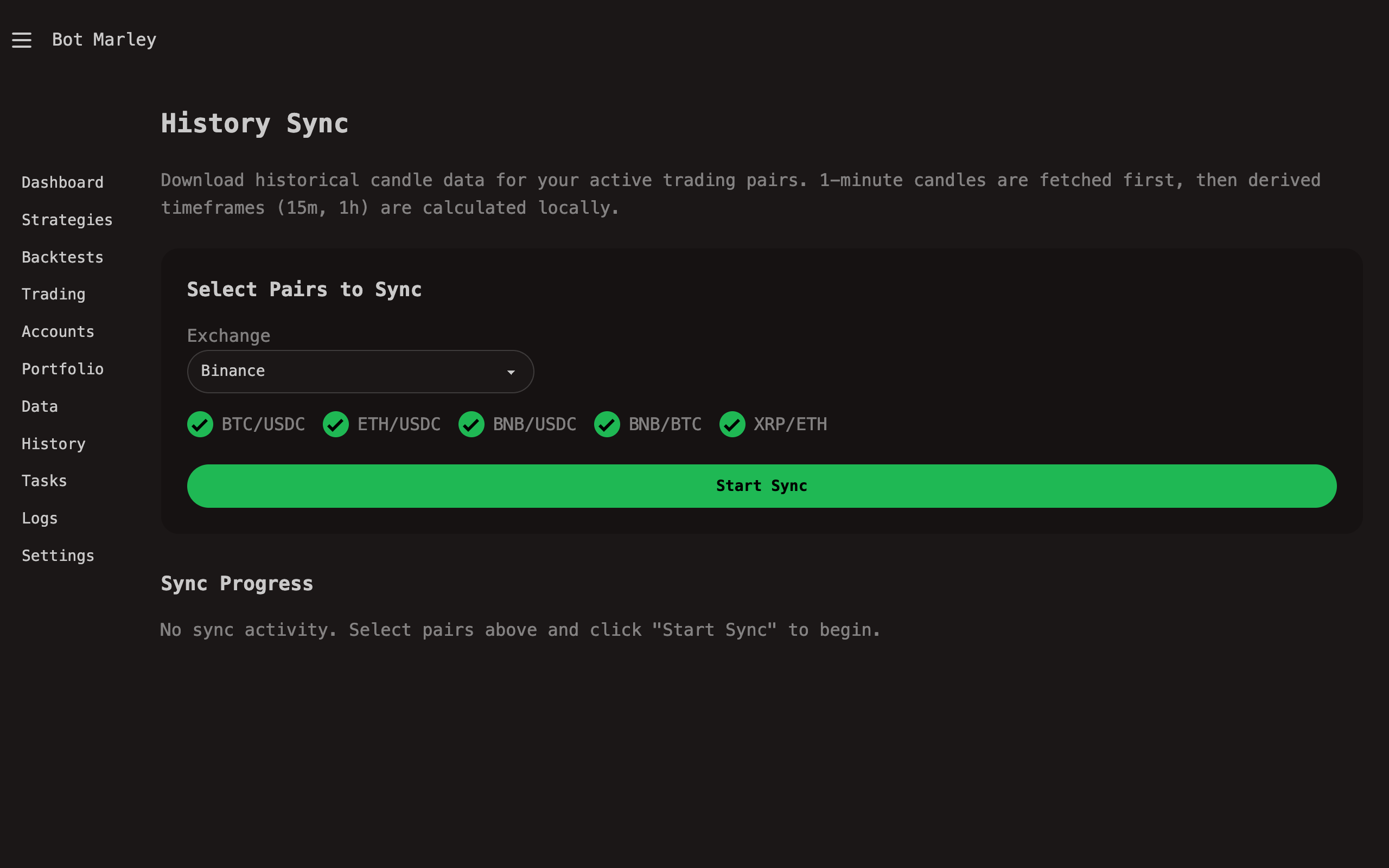
Step by Step: Downloading Candle Data
1. Select the Exchange
At the top of the History page, choose which exchange to fetch data from using the exchange radio buttons:
- Kraken -- uses the Kraken REST API (
/0/public/OHLC). Returns up to 720 candles per request. - Binance -- uses the Binance REST API (
/api/v3/klines). Returns up to 1000 candles per request.
2. Select Trading Pairs
Choose which pairs you want to download data for. Note that each exchange uses its own pair naming convention:
| Exchange | Pair | Description |
|---|---|---|
| Kraken | XBTUSD | Bitcoin / US Dollar |
| Kraken | ETHUSD | Ethereum / US Dollar |
| Kraken | SOLUSD | Solana / US Dollar |
| Kraken | XBTEUR | Bitcoin / Euro |
| Binance | BTCUSDC | Bitcoin / USDC |
| Binance | ETHUSDC | Ethereum / USDC |
| Binance | SOLUSDC | Solana / USDC |
| Binance | BTCUSDT | Bitcoin / Tether |
Only download pairs you actually plan to trade or backtest. Each pair consumes disk space and sync time. You can always add more pairs later.
Botmarley converts the user-friendly pair format internally. For example, "BTC/USD" becomes "XXBTZUSD" for Kraken and "BTC/USDC" becomes "BTCUSDC" for Binance. The History page handles this conversion automatically.
3. Click Sync
Click the Sync button next to a pair. This creates a HistorySync task in the Task Queue and begins downloading in the background.
4. Monitor Progress
The sync runs as a background task. You can monitor it in two ways:
- History page -- the status updates with a progress indicator showing how many candles have been fetched so far.
- Tasks page (
/tasks) -- the HistorySync task shows its current state (Pending, Running, Completed, or Failed).
The page auto-refreshes, so you do not need to manually reload.
What Gets Downloaded
Botmarley fetches 1-minute candles from the selected exchange's REST API. For Kraken, each API call returns up to 720 candles (12 hours of 1-minute data). For Binance, each call returns up to 1000 candles (roughly 16.5 hours). For a full history going back several months, Botmarley makes many sequential requests, paging backward through time.
Derived Timeframes
Once 1-minute data is on disk, Botmarley can compute larger timeframes automatically by aggregating the base candles:
| Derived Timeframe | How It Is Built |
|---|---|
| 5m | Every 5 consecutive 1m candles are merged |
| 15m | Every 15 consecutive 1m candles are merged |
| 1h | Every 60 consecutive 1m candles are merged |
flowchart LR
    A["1m candles<br/>(stored on disk)"] --> B["5m<br/>(aggregated)"]
    A --> C["15m<br/>(aggregated)"]
    A --> D["1h<br/>(aggregated)"]

    style A fill:#5865f2,color:#fff
The aggregation computes each derived candle as follows:
- Open = open of the first 1m candle in the group.
- High = maximum high across all 1m candles in the group.
- Low = minimum low across all 1m candles in the group.
- Close = close of the last 1m candle in the group.
- Volume = sum of volumes across all 1m candles in the group.
Derived timeframes are computed on the fly when needed -- they are not stored as separate files. This keeps storage requirements low while still supporting multi-timeframe strategies and analysis.
Storage Location
Downloaded candle data is stored in your Botmarley data directory:
~/.botmarley/data/
├── XBTUSD/
│   └── 1m.arrow
├── ETHUSD/
│   └── 1m.arrow
└── ...
The default base path is ~/.botmarley/data/. You can change this in Settings under the Data section.
Setting a Custom Start Date
By default, Botmarley downloads as much history as the exchange provides (which can go back several years for major pairs). If you want to limit the download to a specific date range:
- Go to Settings (
/settings). - Under Data Settings, find the History Start Date field.
- Enter the earliest date you want data for (e.g.,
2024-01-01). - Save settings.
The next time you run a History Sync, Botmarley will only fetch candles from that date onward. Candles already downloaded before that date are not deleted -- they remain on disk.
Incremental Downloads
Botmarley tracks the latest candle timestamp for each pair. When you click Sync again:
- If data exists on disk, only candles after the last stored timestamp are fetched.
- If no data exists, a full download starts from the configured start date (or from the earliest available on the exchange).
This makes subsequent syncs fast -- typically just a few seconds to catch up to the present.
Tips for Effective Data Management
Download at least 90 days of data for any pair you plan to backtest. Most indicators need a warm-up period (e.g., a 200-period EMA needs at least 200 candles before producing meaningful values), and short data ranges can lead to misleading backtest results.
Both Kraken and Binance rate-limit API requests. If you are downloading data for many pairs simultaneously, some sync tasks may take longer or temporarily pause while respecting rate limits. Botmarley handles this automatically -- just let the tasks run.
- Disk space: 1-minute candles for one year of a major pair like XBTUSD or BTCUSDC typically use around 50-100 MB in Arrow format. This is very modest by modern standards.
- Network: First syncs for pairs with years of history may take 10-30 minutes depending on your connection and the exchange's rate limits.
- Freshness: Remember to re-sync before running backtests if you want results that include recent market activity.
Troubleshooting
| Problem | Solution |
|---|---|
| Sync task stays "Pending" | Check that the task worker is running. See Task Queue. |
| Sync fails with "Rate limit" | Wait a few minutes and retry. Both Kraken and Binance impose request limits. |
| No data for a pair | Verify the pair name matches the exchange's naming convention. Kraken uses names like XBTUSD (not BTCUSD). Binance uses names like BTCUSDC (not BTC/USDC). |
| Very slow first sync | This is normal for pairs with years of history. Let it run to completion. |